Browser extension
The read,
on the token page.
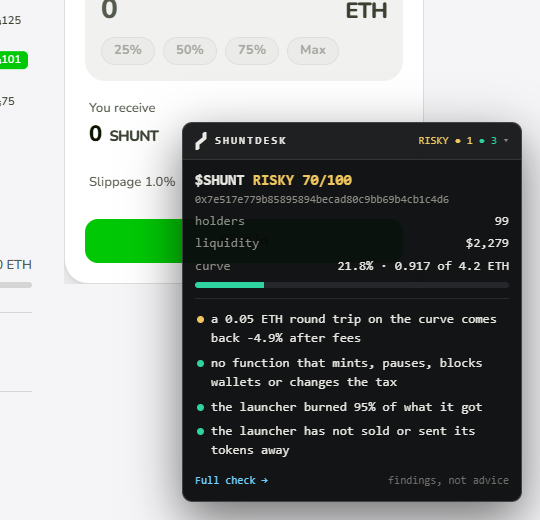
OPEN A TOKEN ON BSC_LAUNCHPAD OR DEXSCREENER AND SHUNTDESK'S READ SITS IN THE CORNER: THE CONTRACT, THE LAUNCHER, THE CURVE. IT READS ONLY. IT NEVER ASKS FOR A WALLET OR A SIGNATURE.
InstallChrome, Edge, Brave and other Chromium browsers
- Download the extension and unzip it.
- Open
chrome://extensions(in Edge,edge://extensions). - Turn on Developer mode.
- Press Load unpacked and pick the unzipped
shuntdesk-extensionfolder. - Open any token on BSC launchpad or DexScreener's BNB Smart Chain pages.
What it showsthe same reads as the site
- The verdict on file, holders, liquidity and the curve
- What the contract can do: mint, pause, block wallets, change the tax, swap the code
- What the launcher did with its tokens: sold, sent away, burned
- What a 0.05 BNB round trip on the curve comes back as
- A part that could not be read is said as not read
On a token pagefolded to one line until you open it
It runs only on BSC launchpad and dexscreener.com/bsc, and talks only to shuntdesk.xyz and DexScreener's public API. Nothing is stored. The source is in extension/. Not advice.
ex when this page opened. Not advice.